

Detecting Abuse of OpenEDR’s Permissive EDR Trial: A Security Researcher’s Perspective

Endpoint Detection and Response (EDR) solutions are fundamental to a cybersecurity program. But what happens when these powerful security tools are turned against us, becoming the very vector for an attack? This is the paradox we now face with the increasing abuse of Cloud-based EDRs and legitimate Remote Monitoring and Management (RMM) tools. This trend is especially worrying when these capabilities are provided via highly permissive trial access programs.
This article explores the security implications of the OpenEDR EDR, powered by Xcitium’s cloud platform. We will examine how the platform’s comprehensive RMM features, along with a notably open trial access policy, form a powerful mix that could be exploited by threat actors. While many EDR vendors are tightening access and restricting interactive command execution in their trial versions, OpenEDR’s permissive approach really stands out, allowing anyone with a non-business email to gain full-featured access for extended periods.
For security operation centers (SOCs) and blue teams, this presents a significant challenge: how do you detect malicious activity when it’s being carried out by a legitimately signed, trusted security product? This post will not only analyze the problem but also offer practical, actionable detection strategies, including Sigma rules, to assist you in identifying and mitigating a potential abuse of Xcitium’s cloud platform. The goal is not to single out this vendor, but to shed light on a critical security gap and empower defenders with the knowledge to protect their organizations.
Before we continue with the article, I want to note that although gaining trial access could potentially be exploited for an attack, I have not personally seen any such abuse happen in the wild yet.
2. The Trial Access Problem
The low barrier to entry for powerful RMM tools is a growing concern for security professionals. In the case of OpenEDR, the trial access model is particularly permissive, creating a scenario where threat actors can easily obtain and weaponize a legitimate security tool. This section will break down the specifics of the trial access process, the benefits it offers to attackers, and the real-world scenarios that can arise from this level of accessibility.
2.1 Easy Access, Powerful Capabilities
The registration process for the OpenEDR platform is very simple. As observed during my research, a user can create a free account with just a name, an email address, and a fake phone number. There is no apparent validation to ensure the email address is from a legitimate business, meaning anyone with a standard Gmail, Yahoo, or even a temporary email account can gain access. The trial period offers full-featured access for at least 30 days, and as the outline suggests, this can be easily renewed by creating new accounts with different email addresses, including those from disposable email services.
This simple access stands in sharp contrast to the increasingly strict trial requirements of other EDR vendors, who usually demand business email verification and sometimes a more detailed vetting process. The lack of such controls in the OpenEDR trial effectively opens the door for anyone, including malicious actors, to provision a fully functional RMM and EDR platform.
2.2 The Threat Actor Perspective
From a threat actor’s point of view, this permissive trial access is a golden opportunity. It provides them with:
- Legitimate, Signed Binaries: The EDR agent is a signed, trusted application, which allows it to bypass application whitelisting and other security controls that would typically block unknown or untrusted software.
- Cloud-Based Command and Control (C2): The Xcitium platform itself becomes the C2 infrastructure. All communication between the compromised host and the attacker is routed through legitimate, trusted domains and IP addresses associated with the vendor, making it difficult to detect and block.
- Evasion and Stealth: Because the RMM tool is a legitimate security product, its actions are less likely to be flagged as malicious by other security solutions. Processes running as SYSTEM, file modifications, and command executions all appear to be legitimate administrative actions.
2.3 Real-World Attack Scenarios
The potential for abuse is not merely theoretical. The “EDR-on-EDR violence” phenomenon, as detailed by researchers Ezra Woods and Mike Manrod, demonstrates how attackers are actively using free trials of EDR products to disable other security tools on a compromised system [1]. This is just one of many possible scenarios. Other potential abuses include:
- Initial Access Brokering: A threat actor could create and sell pre-configured trial accounts to other malicious groups, providing them with a ready-to-use RMM platform for their attacks.
- Ransomware Deployment: Ransomware operators can use the RMM’s file management capabilities to upload and execute their payloads, and the command execution features to disable security controls and move laterally across the network.
- Data Exfiltration: The file explorer feature can be used to browse the file system of a compromised host and exfiltrate sensitive data to the attacker-controlled cloud console.
- Persistence: The RMM’s task scheduling and service management capabilities can be used to create persistent backdoors that survive reboots and evade detection.
EDR Vendor Trial Restriction Comparison
To highlight the permissive nature of the OpenEDR trial, the following table compares the trial access restrictions of several major EDR vendors. This information is based on publicly available information and our own research, and may be subject to change.
Legend: ✅ = Fully available/required, ❌ = Not available/not required
As the table illustrates, OpenEDR stands out for its lack of a business email requirement and the full availability of RMM features, including an interactive command shell, in its trial offering.
3. Feature-Rich Response Capabilities: A Double-Edged Sword
The power and convenience of a full-featured EDR solution are undeniable for legitimate IT administration. However, in the hands of a threat actor, these same capabilities become a powerful arsenal for malicious activities. This section will explore the specific response features offered by the OpenEDR cloud platform, how each can be subverted for nefarious purposes, and the detection strategies to counter these threats.
3.1 File Explorer & File Management
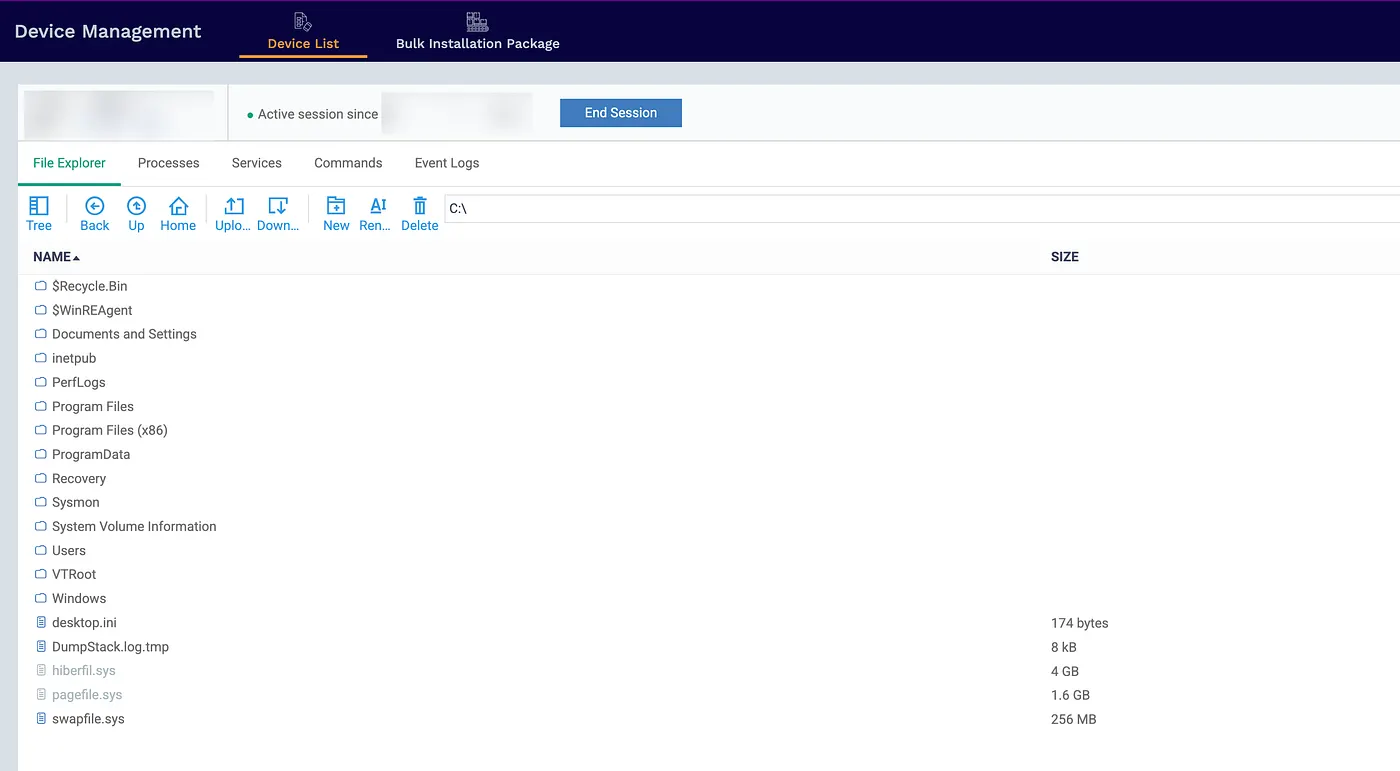
Capabilities:
The file explorer provides complete and unfettered access to the remote system’s entire filesystem. This includes the ability to:
- Browse all directories, including hidden and system folders.
- Upload files from the attacker’s machine to any location on the target system.
- Download files from the target system to the attacker’s machine.
- Create, modify, and delete files and directories.
Detection Strategy:
To detect the malicious use of the file management capabilities, security teams should:
- ✓ Monitor for file creation events originating from the
ITSMService.exeprocess. - ✓ Alert on the creation of executable or script files in unusual locations, such as user directories or temporary folders.
- ✓ Track file uploads to sensitive directories like
C:\Windows\System32or root directories.
Sigma Rule Reference: file_event_win_comodo_itsm_suspicious_file_creation.yml
- DetectionStream link: t.ly/jIE0U
3.2 Interactive Command Execution (CMD & PowerShell)
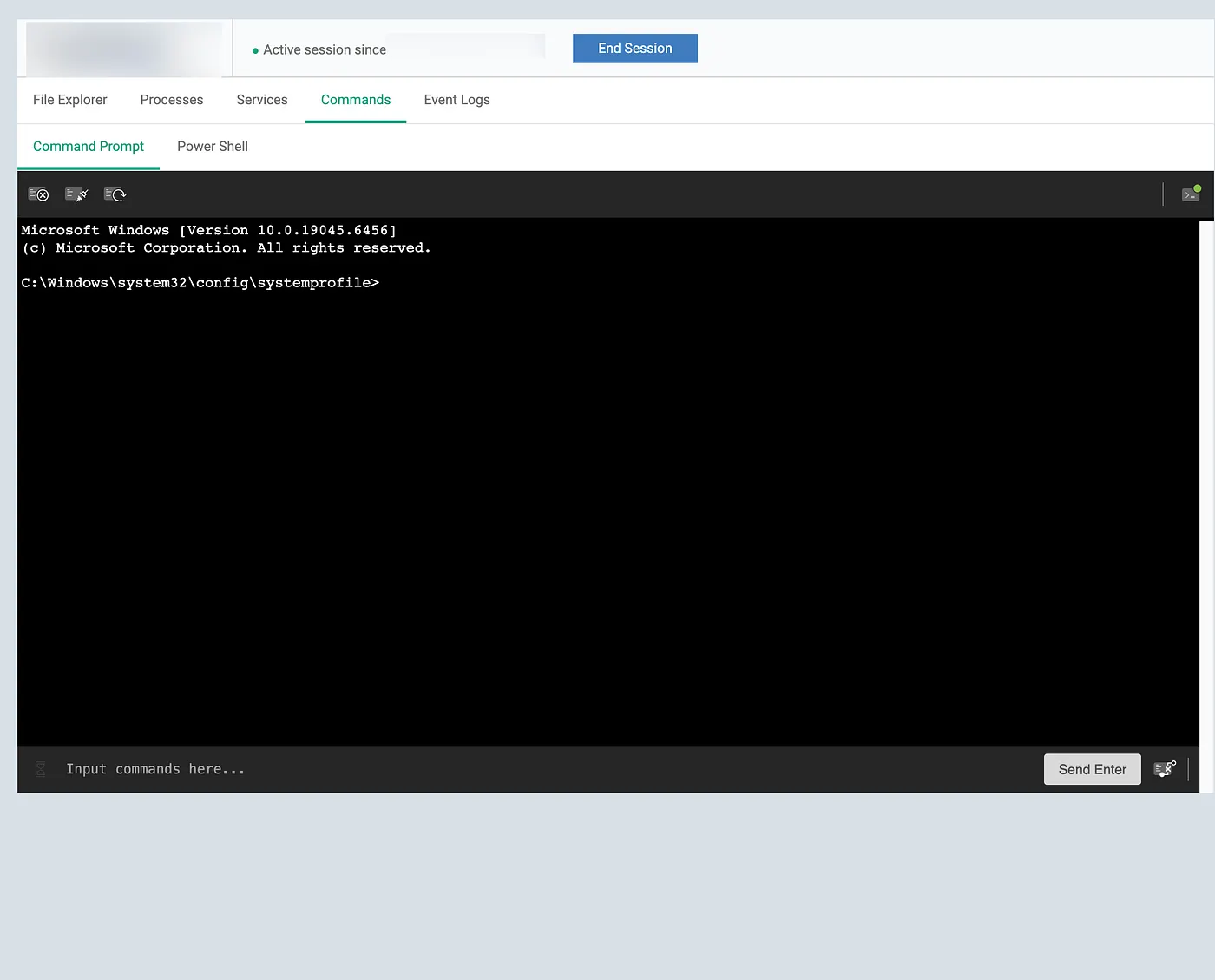
Capabilities:
The ability to execute commands remotely and interactively is perhaps the most powerful and dangerous feature of any RMM tool. The OpenEDR platform provides:
- Execution as SYSTEM or as the logged-in user, giving the attacker the highest level of privilege on the system.
- Interactive shell sessions with pseudo-terminal (PTY) support, allowing for a fully interactive command-line experience.
- Full PowerShell access, including the ability to run complex scripts and access advanced system management capabilities.
- Command history and output capture, which, while useful for legitimate administrators, also allows attackers to track their activities and gather information.
Detection Strategy:
Detecting malicious command execution through a legitimate RMM tool requires a focus on behavioral indicators:
✓ Monitor for the ssh-shellhost.exe process spawning cmd.exe or powershell.exe .
- ✓ Alert on the use of the
— ptyflag in the command line, which indicates an interactive session. - ✓ Track parent-child process relationships to identify suspicious process chains.
- ✓ Correlate command execution with other suspicious activities, such as file creation or network connections.
Sigma Rule Reference: proc_creation_win_comodo_ssh_shellhost_cmd_spawn.yml
- DetectionStream Link: t.ly/eTqUW
Code Block Example:
# Detection Logic Snippet
detection:
selection_image:
Image|endswith: '\COMODO\Endpoint Manager\ssh-shellhost.exe'
selection_cmdline_cmd:
CommandLine|contains|all:
- '--pty'
- 'cmd'
selection_cmdline_powershell:
CommandLine|contains|all:
- '--pty'
- 'powershell'
3.3 Service Management

Service Management
Capabilities:
The RMM platform provides comprehensive control over Windows services, allowing an administrator (or attacker) to:
- View a list of all services and their current status (running, stopped, etc.).
- Start, stop, and restart any service on the system.
Detection Considerations:
Monitoring service management activity is crucial for detecting this type of abuse:
- Monitor for service control events, particularly Event IDs 7035 (service stop), 7036 (service start), and 7040 (service created).
- Create high-priority alerts for any modifications to critical security services.
3.4 Process Explorer
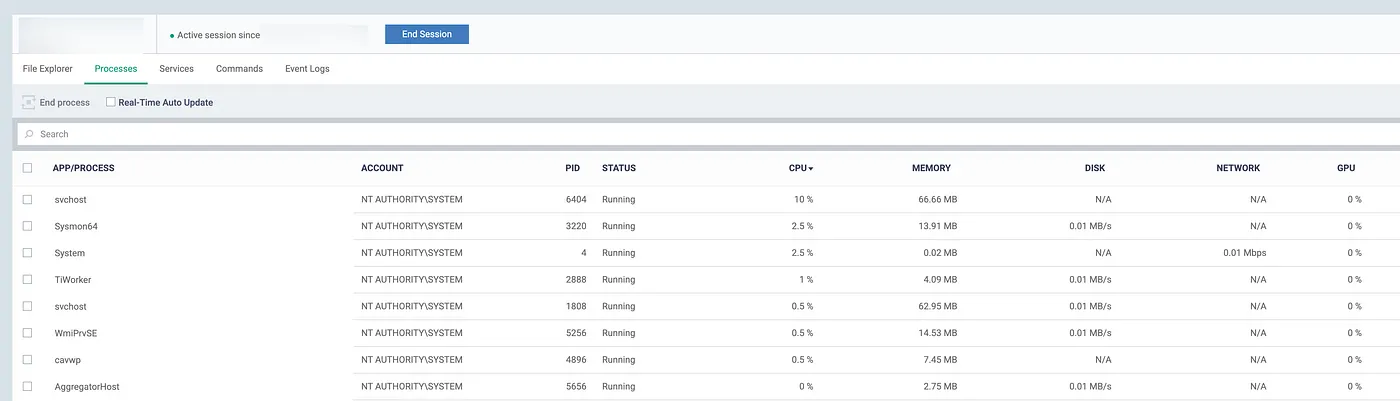
Process Explorer
Capabilities:
The RMM provides a detailed view of all running processes and the ability to interact with them directly:
- View a list of all running processes, along with their command lines, memory usage, and other details.
- Terminate any process on the system.
3.5 Windows Event Log Viewing
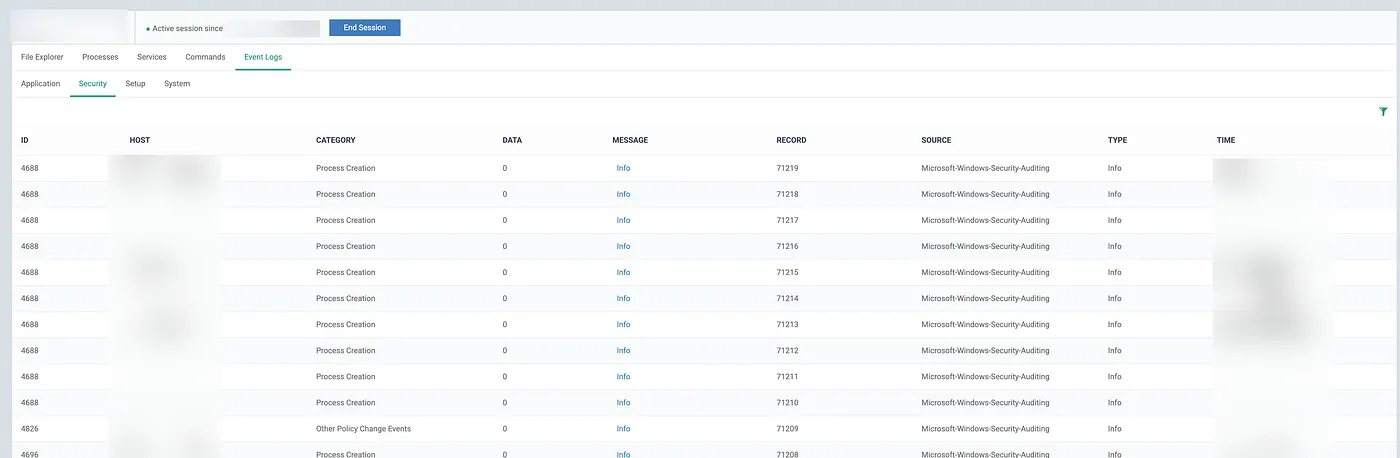
Windows Event Log Viewing
Capabilities:
One capability that often flies under the radar but is incredibly valuable to attackers is the ability to view Windows Event Logs directly through the RMM interface. The OpenEDR platform provides:
- Access to all Windows Event Log categories (Application, Security, Setup, System)
- Filtering capabilities by event ID, source, category, and time range
- Real-time viewing of security-relevant events
- Ability to search and export log data
4. The Detection Challenge
The abuse of legitimate RMM tools like OpenEDR presents a significant detection challenge for security teams. Traditional detection methods, which often rely on signatures, blacklists, and known indicators of compromise (IOCs), are largely ineffective against this type of threat. This is because the attacker is not using traditional malware, but rather a legitimate, signed, and trusted security product.
4.1 Why Traditional Detection Fails
There are several reasons why traditional detection methods fall short in this scenario:
- Signed Binaries and Trusted Paths: The OpenEDR agent and its associated processes are all digitally signed by COMODO/Xcitium, a legitimate and trusted software vendor. They are also installed in standard locations like
C:\Program Files, which are typically trusted by security software. - Expected Behavior: RMM tools are supposed to execute commands, manage files, and interact with services. This makes it difficult to distinguish between legitimate administrative actions and malicious activity based on the action alone.
- Legitimate Network Traffic: All communication between the compromised endpoint and the attacker-controlled console is encrypted and sent to the legitimate domains and IP addresses of the Xcitium platform. This traffic is indistinguishable from legitimate RMM traffic.
- SYSTEM Context: RMM agents typically run with the highest level of privilege (NT AUTHORITY\SYSTEM) to perform their administrative functions. As a result, even highly privileged actions may not be flagged as suspicious.
4.2 A Behavioral Detection Approach
Given the limitations of traditional detection methods, a behavioral approach is essential for identifying the malicious use of RMM tools. Instead of focusing on what tool is being used, a behavioral approach focuses on how it is being used. This involves:
- Establishing a Baseline: Understanding what normal RMM usage looks like in your environment is crucial. Any deviations from this baseline can then be flagged as potentially suspicious.
- Context is Key: The context surrounding an action is often more important than the action itself. For example, the execution of
whoamiis not inherently malicious, but when it is executed at 3 AM on a server that is not typically accessed at that time, it becomes highly suspicious. - Correlation of Events: A single suspicious action may not be enough to trigger an alert, but a series of suspicious actions occurring in a short period of time can be a strong indicator of malicious activity. For example, the creation of a new user account, followed by the mapping of a network drive, followed by the execution of a PowerShell script, is a classic attack pattern.
4.3 Key Detection Principles
To effectively detect the abuse of RMM tools, security teams should focus on the following key principles:
- Process Ancestry: Carefully track parent-child process relationships. A legitimate RMM agent spawning an unusual or unexpected process is a strong indicator of malicious activity.
- Command Line Analysis: Scrutinize the command lines of all processes, especially those executed by the RMM tool. Look for reconnaissance commands, attack patterns, and the use of LOLBAS.
- File Operations: Monitor for unusual file creation, modification, or deletion events, especially in sensitive directories or involving suspicious file types.
- Temporal Correlation: Correlate events over time to identify attack patterns. A series of suspicious actions occurring in a short timeframe is a strong indicator of an active attack.
- User Context: Pay close attention to the user context of all actions. Actions performed by unexpected user accounts or at unusual times should be investigated.
5. Sigma Detection Rules: Practical Implementation
To help security teams proactively detect the abuse of OpenEDR’s RMM capabilities, I have developed two Sigma rules. Sigma is an open-source, generic signature format for SIEM systems, which allows for the creation of detection rules that can be shared and converted to various SIEM query languages. This section provides a detailed breakdown of each rule, along with guidance on how to deploy and tune them in your environment.
5.1 Rule #1: Interactive Shell Detection
File: proc_creation_win_comodo_ssh_shellhost_cmd_spawn.yml
What It Detects:
This rule detects the COMODO/Xcitium ssh-shellhost.exe process spawning an interactive command shell, either cmd.exe or powershell.exe. This is a strong indicator of an attacker using the RMM's remote command execution feature to gain an interactive shell on a compromised system.
Rule Breakdown:
title: COMODO Endpoint Manager SSH Shell Host Spawning Command Shell
detection:
selection_image:
Image|endswith: '\COMODO\Endpoint Manager\ssh-shellhost.exe'
selection_cmdline_cmd:
CommandLine|contains|all:
- '--pty'
- 'cmd'
selection_cmdline_powershell:
CommandLine|contains|all:
- '--pty'
- 'powershell'
selection_parent:
ParentImage|endswith: '\ITSMService.exe'
condition: all of selection_image and (selection_cmdline_cmd or selection_cmdline_powershell) and selection_parent
Key Fields Captured:
CommandLine: The full command line of thessh-shellhost.exeprocess, which will include the--ptyflag and the name of the shell (cmdorpowershell).ProcessId/ParentProcessId: The process IDs of thessh-shellhost.exeprocess and its parent,ITSMService.exe, which can be used for correlation with other events.User: The user account under which the process is running, which should beNT AUTHORITY\SYSTEMin this case. **Note that this could also be the logged-in user.
Tuning Recommendations:
- Reduce False Positives: If your organization’s administrators legitimately use the interactive shell feature, you may need to whitelist their user accounts or the specific systems they manage.
- Increase Sensitivity: For a more aggressive detection posture, you can remove the
selection_parentcondition to catch all instances ofssh-shellhost.exespawning a shell, regardless of the parent process. - Add Context: Correlate alerts from this rule with other security events, such as authentication logs or network traffic, to gain a more complete picture of the activity.
Example Sysmon Event log message (EID 1):
Process Create
---
RuleName: technique_id=T1083,technique_name=File and Directory Discovery
UtcTime: 2025-10-21 18:26:51.022 ProcessGuid: {b09ccb25-d06b-68f7-0101-000000001500}
ProcessId: 10040
Image: C:\Program Files (x86)\COMODO\Endpoint Manager\ssh-shellhost.exe
FileVersion: -
Description: -
Product: -
Company: -
OriginalFileName: -
CommandLine: "C:\Program Files (x86)\COMODO\Endpoint Manager\ssh-shellhost.exe" ---pty cmd --width 130 --height 30 --log-dir "C:\ProgramData\COMODO\Endpoint Manager"
CurrentDirectory: C:\Windows\system32\config\systemprofile
User: NT AUTHORITY\SYSTEM
LogonGuid: {b09ccb25-cd2a-68f7-e703-000000000000}
LogonId: 0x3E7
TerminalSessionId: 0
IntegrityLevel: System
Hashes: SHA1=A7FA727EF16269045E8FB09F49091C549710514D,MD5=DC88B0545B6AAF86C267ECE823E8A4C4,SHA256=1D6F35E716A4643DFDD233F8E7EE379D13BC6F25BA96A62AF4C1622A053451A9,IMPHASH=47A9D28E4486FFD697CEA3B06FDB0B94
ParentProcessGuid: {b09ccb25-cd2d-68f7-4c00-000000001500}
ParentProcessId: 3156
ParentImage: C:\Program Files (x86)\COMODO\Endpoint Manager\ITSMService.exe
ParentCommandLine: "C:\Program Files (x86)\COMODO\Endpoint Manager\ITSMService.exe"
ParentUser: NT AUTHORITY\SYSTEM
5.2 Rule #2: Suspicious File Creation
File: file_event_win_comodo_itsm_suspicious_file_creation.yml
What It Detects:
This rule detects the ITSMService.exe process creating a file with a suspicious extension. This is indicative of an attacker using the RMM's file management feature to upload a malicious payload to a compromised system.
Rule Breakdown:
title: COMODO Endpoint Manager Suspicious File Creation via ITSMService
detection:
selection_process:
Image|endswith: '\COMODO\Endpoint Manager\ITSMService.exe'
selection_suspicious_extensions:
TargetFilename|endswith:
- '.exe'
- '.dll'
- '.ps1'
- '.bat'
- '.cmd'
- '.vbs'
- '.js'
- '.hta'
- '.scr'
- '.com'
- '.pif'
- '.zip'
- '.rar'
- '.7z'
condition: selection_process and selection_suspicious_extensions
Key Fields Captured:
TargetFilename: The full path of the created file, which can be used to identify the location and name of the suspicious file.CreationUtcTime: The timestamp of the file creation event, which is crucial for timeline analysis.User: The user account that created the file, which will likely beNT AUTHORITY\SYSTEM.ProcessId: The process ID of theITSMService.exeprocess, which can be used for correlation.
Tuning Recommendations:
- Add Location Filters: To reduce false positives, you can add a condition to the rule to only alert on files created in specific locations, such as user directories (
C:\Users\*) or temporary folders (C:\Windows\Temp). - Whitelist Legitimate Deployments: If your organization uses the RMM to deploy legitimate software, you may need to whitelist the hashes of the known-good files or the specific deployment paths.
Example Sysmon Event log message (EID 11):
File created
---
RuleName: -
UtcTime: 2025-10-21 18:39:46.737
ProcessGuid: {b09ccb25-cd2d-68f7-4c00-000000001500}
ProcessId: 3156
Image: C:\Program Files (x86)\COMODO\Endpoint Manager\ITSMService.exe
TargetFilename: C:\mimikatz.exe
CreationUtcTime: 2025-10-21 18:39:46.737
User: NT AUTHORITY\SYSTEM
6. Recommendations to COMODO/Xcitium
It is important to acknowledge that the RMM features in OpenEDR are intended for legitimate administrative use. The permissive trial is likely designed to showcase the full capabilities of the product and to make it as easy as possible for potential customers to evaluate the software. From the vendor’s perspective, the security of the product depends on its proper deployment and monitoring by the customer.
While we understand the vendor’s perspective, we believe there are several steps that could be taken to mitigate the risk of abuse without significantly impacting the legitimate use of the product:
- Implement Business Email Verification: Requiring a valid business email address for trial accounts would be a simple and effective way to deter casual abuse.
- Restrict High-Risk Features in Trials: The most powerful RMM features, such as the interactive command shell, could be disabled or restricted in trial versions of the product.
- Implement Audit Logging for Trial Users: Providing trial users with a clear and accessible audit log of all RMM activity would increase transparency and accountability.
- Add Rate Limiting: Implementing rate limiting on command execution and file transfers could help to prevent large-scale abuse.
7. Mitigation Strategies for Organizations
Protecting against the abuse of legitimate RMM tools requires a multi-layered, defense-in-depth approach. No single security control is sufficient to prevent, detect, and respond to this type of threat. This section outlines a comprehensive mitigation strategy that organizations can implement to reduce their risk.
7.1 Prevention
The first line of defense is to prevent the unauthorized installation and use of RMM tools in your environment:
- Application Whitelisting: Implement a strict application whitelisting policy that only allows approved software to be installed and executed. This can prevent the unauthorized installation of RMM tools, even if an attacker gains administrative privileges.
- Network Segmentation: Segment your network to restrict the outbound communication of endpoints to only what is necessary for their business function. This can prevent RMM tools from communicating with their cloud-based C2 infrastructure.
- Principle of Least Privilege: Enforce the principle of least privilege to limit the number of users with administrative rights. This will make it more difficult for an attacker to gain the necessary privileges to install an RMM tool.
- Endpoint Hardening: Harden your endpoints by disabling unnecessary services, removing unused software, and implementing other security best practices. This can reduce the attack surface and make it more difficult for an attacker to gain a foothold.
7.2 Detection
As discussed in the previous sections, a behavioral detection approach is essential for identifying the malicious use of RMM tools. This involves:
- Deploying the provided Sigma rules: The Sigma rules for interactive shell detection and suspicious file creation can provide early warning of RMM abuse.
- Baselining normal RMM usage: If you use RMM tools for legitimate administrative purposes, it is crucial to establish a baseline of normal activity. This will allow you to more easily identify anomalous and potentially malicious behavior.
- Alerting on anomalies: Create high-priority alerts for any deviations from the baseline, such as RMM activity occurring at unusual times, from unusual locations, or involving unusual commands.
- Correlating events: Correlate RMM activity with other security events, such as authentication logs, network traffic, and file integrity monitoring, to gain a more complete picture of the threat.
7.3 Response
If you detect the malicious use of an RMM tool in your environment, it is important to have a well-defined incident response plan in place. This plan should include:
- Isolation: Immediately isolate the compromised system from the network to prevent the attacker from moving laterally.
- Credential Rotation: Assume that any credentials stored on or entered into the compromised system have been stolen. Rotate all passwords and other credentials associated with the system and its users.
- Forensic Collection: Preserve the system for forensic analysis. This includes collecting memory dumps, disk images, and all relevant log files.
- Eradication and Recovery: Once the incident has been contained and investigated, eradicate the attacker’s presence from the system and restore it to a known-good state.
7.4 Organizational Policies
Finally, it is important to have clear organizational policies in place regarding the use of RMM tools:
- Approved RMM Tools List: Maintain a list of approved RMM tools that are authorized for use in your environment.
- Change Management: Require that all new RMM deployments go through a formal change management process.
- Vendor Assessment: Before approving a new RMM tool, conduct a thorough security assessment of the vendor and their product.
- User Training: Educate your users about the risks of social engineering attacks that may attempt to trick them into installing malicious RMM tools.
8. Conclusion
The weaponization of legitimate security tools poses a significant challenge for defenders. The example of OpenEDR’s permissive trial access and robust RMM capabilities highlights that even security tools can become major attack points. The ease with which anyone can access a full-featured, enterprise-grade RMM platform with minimal verification poses a significant security risk that cannot be ignored. However, as we have shown in this article, detection is achievable. By shifting our focus from traditional signature-based detection to a behavioral approach, and by leveraging the power of community-driven detection engineering with tools like Sigma, we can regain visibility and control.
Key Takeaways:
For Security Teams:
- ✅ Deploy the provided Sigma rules to gain immediate visibility into potential RMM abuse in your environment.
- ✅ Baseline your RMM tool usage to understand what normal administrative activity looks like.
- ✅ Implement monitoring for all administrative tools, not just known-malicious ones.
- ✅ Test your detection capabilities to ensure you can detect and respond to this type of threat.
For Vendors:
- ✅ Implement stronger trial verification to prevent casual abuse of your products.
- ✅ Restrict high-risk features in trial versions to limit the potential for misuse.
- ✅ Provide clear security guidance to your customers on how to securely deploy and monitor your products.
- ✅ Enable audit logging by default to increase transparency and accountability.
For Researchers:
- ✅ Test other RMM platforms for similar issues to identify other potential security gaps.
- ✅ Share your detection strategies with the community to help others protect themselves.
- ✅ Contribute to the Sigma rule repository to help build a more comprehensive set of community-driven detections.
- ✅ Practice responsible disclosure to ensure that vendors have an opportunity to address any vulnerabilities before they are publicly disclosed.
9. Additional Resources & References
Sigma Rules Repository:
- Rules included:
proc_creation_win_comodo_ssh_shellhost_cmd_spawn.yml
file_event_win_comodo_itsm_suspicious_file_creation.yml
Further Reading:
- [1] Woods, E., & Manrod, M. (2025, July 31). ‘EDR-on-EDR Violence’: Hackers turn security tools against each other. CSO Online. https://www.csoonline.com/article/4032009/edr-on-edr-violence-hackers-turn-security-tools-against-each-other.html
- MITRE ATT&CK: T1219 (Remote Access Software) — https://attack.mitre.org/techniques/T1219/
- MITRE ATT&CK: T1105 (Ingress Tool Transfer) — https://attack.mitre.org/techniques/T1105/
- MITRE ATT&CK: T1059.003 (Command and Scripting Interpreter: Windows Command Shell) — https://attack.mitre.org/techniques/T1059/003/
- Proofpoint. (2025, March 7). Remote Monitoring and Management (RMM) Tooling Increasingly an Attacker’s First Choice. https://www.proofpoint.com/us/blog/threat-insight/remote-monitoring-and-management-rmm-tooling-increasingly-attackers-first-choice
Tools & Frameworks:
- Sigma: https://github.com/SigmaHQ/sigma
- EDR Telemetry Project: https://www.edr-telemetry.com/